Help › 911 and emergency alerts
911 and emergency alerts
This page helps you understand how 911 calls work from your office, test the system safely, and keep the 911 address correct.
How 911 works
Dial 911 from any office phone, just as you would at home. You can also dial 9911. The call goes straight to 911.
Emergency responders see the 911 address that is registered with your phone company for the office number. Use the address where the phones are.
The web phone cannot call 911. Use a desk phone or a cell phone for emergencies.
Test with 933
The number 933 is a safe test line. It checks that 911 service is working. It does not reach anyone who can help you.
- From an office phone, dial 933.
- MeePBX sends an alert email. The subject starts with "Test call to 933" and the email says nobody needs help.
Warning: Never dial 911 to test. A call to 911 is a real emergency call.
Who gets the alert email
Each time 911 is dialed from one of your phones, MeePBX sends an alert email. The email tells you which phone dialed, when, and the callback number. It also tells you the 911 address that was sent.
The email goes to the person who owns your MeePBX account. If someone else in your office should get it, email support@meepbx.com and we will add them.
Keep the 911 address current
You enter the 911 address when you add a phone number. Use the address where the phones are.
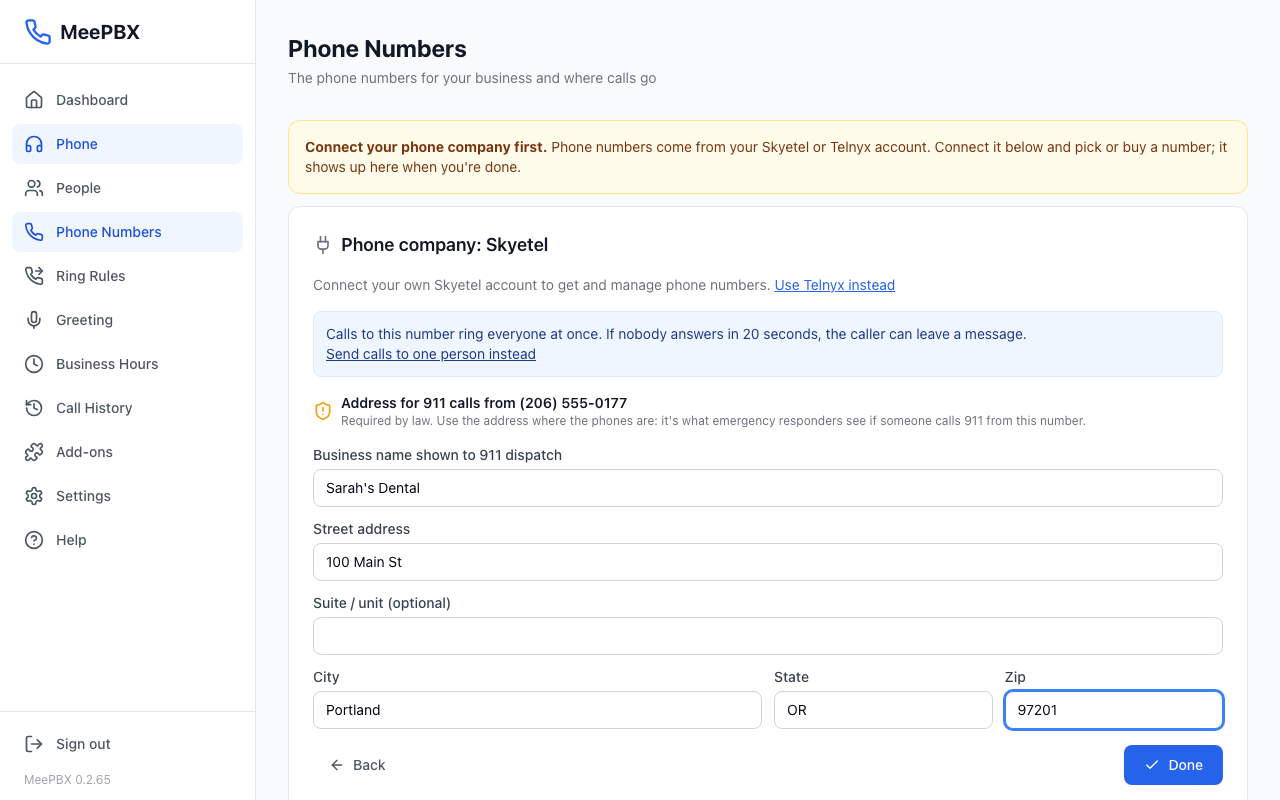
If the office moves, the 911 address must change too. Email support@meepbx.com (weekdays, 9 to 5 ET) to ask how to update it before the move.
Not supported: multi-floor offices
MeePBX takes one 911 address for each phone number. It does not give each floor of one office its own 911 address. If your office has more than one floor, email support@meepbx.com before you go live.
Related articles
- Phone company to add a number and enter its 911 address.
- Web phone to see what the web phone can and cannot do.
- Getting help to reach our support team.
Ready to try it? Your phone system is free for 7 days, no card needed.
Join the beta: 7 days free